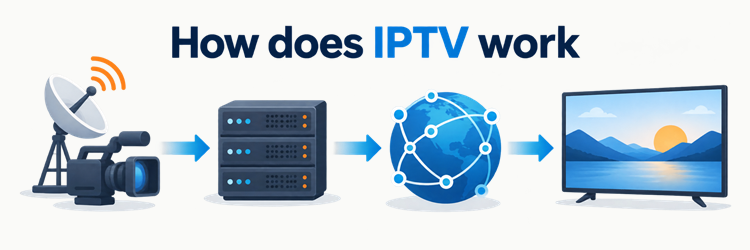
How does IPTV work? A service receives or produces television, compresses it into digital video, prepares it for delivery, and sends it as Internet Protocol data to an authorised app or set-top box. The player requests a channel or programme, receives packets or short media segments, buffers them briefly, decodes them, and displays the picture and sound. I checked the underlying standards and current platform documentation on September 25, 2026.
That is the useful short answer, but it is deliberately simplified. IPTV is not one universal architecture. A telecom operator may deliver live channels across a managed broadband network, while an internet streaming service may use ordinary web servers and a content delivery network. Authentication, encryption, programme guides, catch-up, recording, and adaptive quality can be added in different combinations. This guide follows the common source-to-screen path, then separates managed IPTV from over-the-top streaming and explains where live TV, video on demand, multicast, and unicast fit.
How Does IPTV Work From Source to Screen?
An IPTV system turns a video source into data a receiving device can request, decode, and render. I use the five-stage outline below as a practical map, not a claim that every operator builds the same stack. The ITU definition of IPTV emphasises IP-based networks managed for quality, security, interactivity, and reliability; everyday usage often applies the label more broadly to television delivered through internet protocols.
| Stage | What usually happens | Viewer-facing result |
|---|---|---|
| Acquire | Live feeds or stored programmes enter the platform | A channel or title exists in the catalogue |
| Encode and package | Video is compressed into one or more renditions and prepared for transport | The same programme can suit different devices or connections |
| Serve and distribute | Origin systems, managed networks, or CDNs deliver the media | Data reaches a nearby network path or edge cache |
| Authorise | Account, device, entitlement, and protection checks may run | Eligible playback is allowed |
| Play | The app buffers, decodes, synchronises, and renders audio and video | The programme appears on screen |
The boundaries can overlap. A live encoder may package segments continuously, an origin may sit inside a cloud platform, and the player may change quality while playback continues.
1. Content Acquisition and Encoding
The chain begins with content the service is permitted to distribute: a live studio or event feed, a broadcast contribution feed, or a stored master file. I treat acquisition as the input stage because it happens before home delivery. Operators can monitor, caption, switch, or otherwise prepare that incoming material, but the exact contribution links and production workflow are implementation-dependent.
An encoder compresses raw or lightly compressed audio and video into practical delivery formats. It may create several renditions of the same programme, such as different resolutions and bitrates. That multi-rendition set supports devices with different screen sizes and gives an adaptive player alternatives when connection capacity changes. Encoding is lossy in most consumer delivery systems: the aim is an acceptable picture at a manageable data rate, not a bit-for-bit copy of the studio source. Live encoding happens continuously; video-on-demand assets can be encoded ahead of time.
2. Origin Servers, Packaging, and Storage
After encoding, the platform prepares media for its chosen delivery method. I separate packaging from encoding because one compressed source can be wrapped for different players or networks. For HTTP streaming, a packager commonly divides the programme into addressable media segments and creates a manifest or playlist that tells the client where those segments are located and how they relate.
RFC 8216 describes this pattern for HTTP Live Streaming: a media playlist lists sequential segments, while a master playlist can describe alternate versions of the same content. An origin server makes those playlists and segments available. For on-demand viewing, the origin may retrieve completed assets from storage. For live television, new segments or transport packets appear as the event progresses. Some platforms also encrypt packaged media, attach timed metadata, or retain a rolling archive for replay features. These are common capabilities, not universal requirements.
3. IP Delivery Through Managed Networks or CDNs
Delivery moves the prepared media across Internet Protocol networks. I distinguish two broad paths because they explain much of the confusion around IPTV. A managed operator can control access links and network policies end to end, while an internet-delivered service commonly sends HTTP requests across ordinary connectivity and uses a content delivery network to place cached media closer to viewers.
With segmented streaming, CDN edge servers can cache popular pieces and reduce repeated trips to the origin. Apple’s HTTP Live Streaming overview notes that HLS works with ordinary web servers and CDNs and can adapt to changing network conditions. In a managed network, live linear channels may instead use IP multicast so the network can replicate one flow for many subscribed receivers. On-demand requests and many public-internet streams normally use unicast, creating a separate delivery relationship for each viewer. Real deployments can combine these approaches.
4. Authentication, Apps, and Playback
Before or during playback, a service may verify an account, device, subscription, location, concurrent-stream limit, and entitlement to the selected programme. I say “may” because free, public, enterprise, and subscription services do not share one login model. Authorisation decides whether a viewer is allowed to receive a title; it is different from decoding the media format.
Protected services can also use encryption and a licence exchange. The W3C’s Encrypted Media Extensions specification provides a browser API for interacting with content-protection systems but leaves authentication and authorisation to the application. Once access succeeds, the player obtains a manifest or joins an allowed channel, fills a short buffer, downloads or receives media, decodes compressed frames, keeps audio and video aligned, and renders them. The app may monitor throughput and buffer health, then select another rendition. Menus, credentials, supported codecs, and protection systems vary by provider and device.
Managed IPTV vs OTT Streaming
The strict engineering meaning of IPTV usually describes television delivered over a managed IP network, whereas OTT sends media over the open internet without the television service controlling every network between origin and viewer. I use that distinction because the screen can look identical even when the delivery path is not. The terminology is not applied consistently in marketing, so check the actual service architecture rather than relying on the label alone.
| Question | Managed IPTV | OTT streaming |
|---|---|---|
| Network path | Operator-managed access network | Public internet plus hosting or CDN infrastructure |
| Common live delivery | Multicast can be used inside the managed domain | HTTP unicast is common |
| Quality control | Operator can manage more of the end-to-end path | Quality depends on the service, CDN, ISP, local network, and device |
| Typical receiver | Operator set-top box or approved client | App, browser, smart TV, phone, or streaming device |
| Does the distinction guarantee legality? | No; rights still matter | No; rights still matter |
Both can offer live channels and on-demand programmes. Neither term alone proves picture quality, channel availability, licensing, or compatibility. For receiver choices, the IPTV app guide explains how players differ without treating an app as the television service itself.
Unicast, Multicast, Live TV, and Video on Demand
These terms describe different layers, so they should not be treated as competing names for one technology. I group them here to show which concepts can coexist. “Live” describes timing, “VOD” describes viewer-selected stored media, and unicast or multicast describes how network delivery is organised.
| Term | What it means | Common use | Important limit |
|---|---|---|---|
| Unicast | One delivery relationship per receiver | OTT streams, VOD, personalised playback | Large audiences create many concurrent flows |
| Multicast | The network replicates a group flow for subscribed receivers | Live channels inside managed networks | Needs multicast support across the relevant network |
| Live linear TV | Programmes follow a channel schedule | News, sport, scheduled television | Can be carried by unicast or multicast |
| Video on demand | A viewer starts a stored title | Films, episodes, recordings | Requires stored media and individual session control |
| Catch-up | Earlier scheduled programmes remain replayable for a defined window | Recent channel programmes | Availability depends on rights, archive, account, and app support |
RFC 4607 formalises source-specific multicast as a receiver subscribing to a source-and-group channel. That is a network mechanism, not a universal feature of every service called IPTV. The catch-up TV explainer covers the separate archive and access requirements.
EPG, Catch-Up, Timeshift, and Network DVR
Playback features depend on more than delivery of the current picture. I keep the programme guide separate because an EPG is schedule metadata, not video. It can show what is on now, identify upcoming programmes, and provide an interface for selecting replay or recording actions when the connected platform supports them. The EPG guide explains how guide records are matched to channels.
Catch-up normally exposes completed programmes from a service-controlled archive for a limited period. Timeshift lets a viewer pause or seek within an available live buffer. Network DVR stores recordings on service infrastructure rather than only on the local device. A single platform can support all, some, or none of these features. Visible past guide entries do not prove that playable archives exist, and a player cannot create server-side rights or storage. Retention periods, eligible channels, simultaneous recordings, ad controls, and supported devices are implementation- and account-dependent.
What Affects IPTV Quality and Buffering?
Picture quality depends on the complete path, not just the advertised resolution. I check bitrate stability, latency, packet loss, CDN or origin capacity, home Wi-Fi, device decoding, and player buffering before blaming one component. A high-resolution rendition still stalls if media arrives more slowly than it is consumed, while aggressive compression can keep playback smooth at the cost of detail.
Adaptive bitrate streaming helps by offering alternate renditions. The player estimates current conditions and can step down to protect the buffer or step up when sustained capacity improves. That response is not instant or identical across apps. Live services also balance delay against resilience: a larger buffer can absorb variation but increases the time between the source event and the screen. The IPTV buffering guide provides a fault-isolation sequence for a single device, local network, connection, and service-side issue.
Is IPTV Legal?
IPTV is a delivery technology, so legality turns on content rights, authorisation, contracts, and the law that applies where the service and viewer operate. I would not infer legitimacy from a player format, channel count, low price, or the word “IPTV.” A service needs the relevant permissions for the programming and territories it supplies; an app can be lawful while a source loaded into it is not.
In the United States, the Copyright Office’s discussion of internet retransmission explains that retransmitting copyrighted broadcast programming generally requires the copyright owners’ consent unless an applicable licence covers it. Other countries use their own statutes, licences, exceptions, and enforcement rules. Check the service’s identity and rights claims, use official distribution channels, and seek local legal advice for a specific dispute. This explanation is general information, not a jurisdiction-specific legal opinion.
Final Answer
How does IPTV work? It converts television into compressed digital media, places that media on origin infrastructure, delivers it across IP networks, checks access where required, and lets a compatible player buffer, decode, and display it. I found that the crucial distinction is the delivery environment: managed IPTV can use operator-controlled networking and multicast, while OTT commonly uses HTTP unicast and CDNs.
The details vary. Live and on-demand workflows, encryption, EPG, catch-up, timeshift, recording, and adaptive quality are optional building blocks rather than promises attached to the name. Judge a service by its documented architecture, rights, compatibility, and support—not by the acronym alone.
FAQs
Does IPTV use the internet?
IPTV uses Internet Protocol, but that does not always mean the open public internet. I distinguish operator-managed IPTV from OTT: the former may stay within a controlled broadband network, while the latter normally travels across public internet connections and CDN infrastructure.
Does IPTV need a set-top box?
Not always. I find that managed services often supply an approved set-top box, but OTT-style television can run in a compatible smart-TV app, browser, phone, tablet, or streaming device. Codec, DRM, account, and output requirements determine actual compatibility.
Why can IPTV change picture quality during playback?
Adaptive players can choose among renditions encoded at different bitrates and resolutions. I expect a player to lower quality when estimated throughput or buffer health worsens, then raise it after conditions improve. The switching logic and available renditions vary by implementation.
Is multicast required for IPTV?
No. I treat multicast as one efficient option for distributing live channels inside supported managed networks. Unicast is common for OTT, VOD, personalised sessions, and catch-up. A service can use one method or combine both according to network and product design.