What is IPTV, and how does it work? IPTV delivers television and video through Internet Protocol networks instead of relying only on terrestrial broadcast, coaxial cable, or satellite signals. A service prepares live channels or stored programmes as digital video, sends that data across a managed network or the public internet, and lets a compatible app or set-top box decode it on screen. I checked the underlying standards and current official guidance on October 10, 2026.
The result can feel familiar: choose a channel, open a film, pause a programme, or browse an electronic programme guide. Behind that simple interface, however, are content rights, encoding, servers, network delivery, account checks, buffering, and playback software. This beginner’s guide explains that chain without assuming technical knowledge. It also separates IPTV technology from provider legality, because a delivery method does not prove that a particular service is authorised.
What Is IPTV?
IPTV stands for Internet Protocol Television. It is a way to deliver television, audio, video, text, and related data through IP-based networks. I use the term carefully because its strict engineering meaning is narrower than everyday marketing. The International Telecommunication Union defines IPTV around managed IP networks designed to support service quality, security, interactivity, and reliability.
In ordinary use, people also call many internet-delivered live-TV services “IPTV,” even when they travel across the open internet like other streaming platforms. Both versions turn programmes into digital data and play them through compatible software. The main difference is control of the delivery path: a telecom operator may manage the network from its platform to the customer, while an over-the-top service relies on hosting, content delivery networks, the viewer’s internet provider, and the home connection. IPTV can carry live channels, on-demand titles, catch-up programmes, and guide information, but those features depend on the service rather than the acronym.
How IPTV Works From Source to Screen
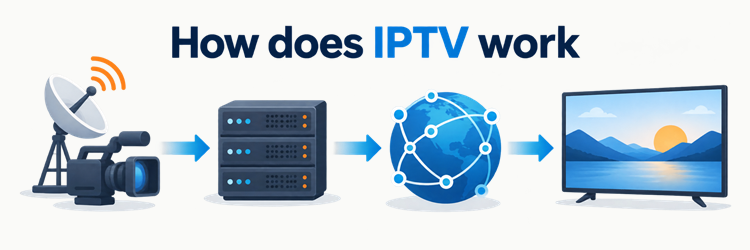
The viewing chain starts before a programme reaches the home. I treat the following six stages as a practical map; operators can combine stages or use different protocols. The core idea stays the same: prepare video, make it available through servers, authorise the viewer where required, deliver the data, and let the receiving device decode it.
| Stage | What happens | What the viewer experiences |
|---|---|---|
| 1. Acquire | A licensed live feed or stored video enters the platform | A channel or title becomes available |
| 2. Encode | Video is compressed into practical bitrates and resolutions | The programme can fit different screens and connections |
| 3. Package | Media is arranged as a stream, packets, or short segments with a playlist | The player knows what to request and in what order |
| 4. Store and distribute | Origin servers, managed networks, or CDNs serve the media | Data travels toward the viewer |
| 5. Authorise | Account, device, territory, and entitlement checks may run | Eligible playback starts; unsupported access may be refused |
| 6. Play | The app buffers, decodes, synchronises, and renders the media | Picture and sound appear on screen |
RFC 8216 illustrates one common internet-streaming method: a playlist points to sequential media segments, and a master playlist can offer several versions of the same content. The player downloads segments, keeps a short buffer, and may switch versions when network conditions change.
What Do You Need to Watch IPTV?
Most viewers need four things: a legitimate television service, a suitable internet connection, a supported device, and the correct app or receiver. I would confirm all four before paying because installation support does not guarantee that a device can decode every format, meet content-protection rules, or play more than one stream at once.
A managed IPTV package may include a provider-issued set-top box connected to the operator’s broadband line. Internet-delivered services may work through a smart TV, phone, tablet, browser, computer, streaming stick, or retail set-top box. Some subscriptions use their own app; others provide credentials for a compatible player. A player is only the viewing software—it does not automatically include channels or programme rights.
Connection needs depend on the service’s actual bitrate, resolution, frame rate, codec, and the number of simultaneous viewers. Stable throughput matters more than a large advertised speed that repeatedly drops. Ethernet can reduce local wireless variation, but well-positioned Wi-Fi may be sufficient. Check the service’s official device list, app-store route, account limits, and current network guidance rather than trusting a generic speed promise.
IPTV vs Cable, Satellite, and OTT Streaming
These services can show similar programmes, but they reach the screen differently. In my comparison, IPTV is best understood as a delivery architecture rather than a genre of content. Cable uses a wired television network, satellite broadcasts from orbit to a dish, managed IPTV uses controlled IP infrastructure, and OTT streaming usually crosses the public internet.
| Option | Typical delivery path | Common receiver | Main practical tradeoff |
|---|---|---|---|
| Managed IPTV | Operator-controlled IP network and broadband access | Approved set-top box or app | More network control, but availability and equipment may be tied to one operator |
| OTT streaming | Public internet through hosting and CDN infrastructure | App, browser, smart TV, or streaming device | Broad device choice, while quality depends on more independent network links |
| Cable TV | Coaxial or hybrid fibre-coax television network | Cable box or approved app | Established channel delivery, often with location and equipment constraints |
| Satellite TV | Broadcast signal from satellite to a dish | Satellite receiver | Wide geographic reach, but needs suitable installation and line of sight |
OTT and IPTV are often used interchangeably in sales copy, so the label alone is not decisive. Apple’s HLS documentation shows how internet video can use ordinary web servers and content delivery networks. A managed service may instead use network features such as multicast for efficient live-channel distribution inside its own domain. Neither path automatically guarantees better quality, broader channels, or lawful rights.
Live TV, VOD, Catch-Up, and the EPG
IPTV platforms can combine several viewing modes. I separate them because a service may support one without the others. Live linear television follows a schedule. Video on demand starts a stored film or episode when the viewer chooses. Catch-up makes recently broadcast programmes available for a limited window, while timeshift pauses or rewinds an available live buffer.
An electronic programme guide, or EPG, is schedule and channel metadata. It helps the app display what is on now and what comes next, but a visible listing does not prove the programme can play. The service still needs a usable stream, account entitlement, and relevant rights. The IPTV catch-up guide explains the archive and replay distinction, while the EPG explainer covers guide data and channel matching.
Network DVR is another separate feature: recordings are stored on provider infrastructure rather than only on the viewing device. Retention periods, eligible channels, simultaneous recordings, advertising controls, and playback locations vary by plan and territory.
Why IPTV Buffers or Changes Picture Quality
Buffering happens when the player does not receive usable media quickly or consistently enough to continue playback. I check the full route rather than blaming the internet speed alone: the source encoder, origin server, CDN or managed network, internet provider, router, Wi-Fi conditions, device decoder, and player can all affect the result.
Many services prepare several renditions of a programme. Adaptive streaming lets the player choose a lower bitrate when throughput or buffer health falls and return to a higher one after conditions improve. RFC 8216 documents this multi-version approach for HLS. A quality change can therefore be protective rather than a fault: the player sacrifices some detail to avoid a complete stall.
For recurring problems, test one device by Ethernet if possible, close competing downloads, restart the player, and compare another legitimate stream. That sequence helps separate a home-network problem from a device or provider issue. The IPTV buffering guide provides a longer fault-isolation checklist. Do not install unknown “boosters” or weaken device security to solve playback trouble.
How Accounts, Encryption, and Playback Protection Fit In
Subscription IPTV commonly checks whether an account, device, location, and selected programme are entitled to play. I distinguish authentication from media decoding: a valid username can identify an account, but the platform may still limit devices, simultaneous streams, territories, or particular events.
Protected services may encrypt media and require the app to obtain a playback licence. The W3C Encrypted Media Extensions specification defines a browser interface for working with content-protection systems, while leaving user authentication and authorisation to the application. That separation explains why copying a playlist or opening the same address in another player may fail even when the original app works.
Security also has a practical customer side. Use official app stores or a provider’s documented installation route, keep the device updated, and avoid sharing credentials. A request to disable security controls, install an unexplained package, or send payment through an untraceable channel deserves scrutiny. Encryption can protect delivery, but it does not prove that a seller owns distribution rights.
Is IPTV Legal and Safe?
IPTV technology is legal; a particular service depends on content permission, territory, contracts, and local law. I would not infer legitimacy from a working app, a huge channel list, a professional website, or a paid invoice. Those details show that a service exists, not that broadcasters, studios, or sports right holders authorised its catalogue.
In the United States, the Copyright Office’s internet retransmission discussion explains that retransmitting copyrighted broadcast programming generally requires the owners’ consent unless an applicable licence permits it. Other countries have their own statutes and enforcement rules, so this is general information rather than legal advice.
Before subscribing, identify the seller, billing entity, terms, supported territories, refund route, and official distribution method. Compare important channels or events with the right holder’s authorised viewing information. Avoid services built around stolen credentials, bypassing access controls, or unexplained worldwide access to premium content. The IPTV legality guide provides a more detailed screening process. Safety also depends on the app source, permissions, payment handling, and account security.
How to Choose an IPTV Service Without Guessing
Start with the programmes, country, devices, and number of simultaneous viewers you actually need. I find that this avoids paying for inflated channel counts that hide missing local feeds, unsupported apps, or account restrictions. Verify each important requirement on the provider’s current official pages before checkout.
- Rights and availability: Look for clear territory, blackout, and package information rather than assuming every listed channel works everywhere.
- Device support: Confirm the exact TV model, operating system, app route, codec, and content-protection requirements.
- Connections: Distinguish the number of devices you may install from the number of streams allowed at the same time.
- Billing: Read the total charged now, renewal terms, taxes, cancellation method, and refund conditions.
- Support: Prefer a verifiable business identity and support channel that remains useful after payment.
- Trial checks: If a legitimate trial exists, test the channels, captions, EPG, playback controls, and busiest viewing period that matter to you.
No checklist can guarantee future performance or rights. Keep evidence of the offer and avoid long commitments until the service proves compatible with your setup.
Final Answer
What is IPTV, and how does it work? It is television delivered through IP networks. A service acquires authorised video, compresses and packages it, serves it through managed infrastructure or internet delivery, checks access where needed, and sends data to an app or set-top box that buffers, decodes, and displays it. I would judge any IPTV offer by its documented rights, supported devices, account limits, billing terms, and real compatibility—not by the acronym or channel count. Managed IPTV and public-internet streaming can look alike, but their network paths and quality controls differ.
FAQs
Does IPTV need a special box?
Not always. I find that managed IPTV often uses an operator-approved set-top box, while internet-delivered services may run on smart TVs, phones, computers, browsers, or streaming devices. The service’s supported app, codec, content protection, and output requirements decide whether a particular device works.
Does IPTV use the public internet?
Sometimes. I distinguish managed IPTV, which can travel through an operator-controlled broadband network, from OTT-style television delivered over the public internet and a CDN. Both use Internet Protocol, but the provider has more control over the end-to-end path in the managed model.
Is IPTV the same as Netflix or YouTube?
Not exactly. I treat Netflix and YouTube as OTT streaming services because they usually cross the public internet, while strict IPTV refers to managed IP television. Everyday marketing often blurs the terms, and all three can use apps, on-demand video, buffering, and adaptive quality.
How much internet speed does IPTV need?
There is no universal number. I would use the service’s current guidance and consider its bitrate, resolution, codec, frame rate, simultaneous streams, and network overhead. A stable connection slightly above the stream’s sustained demand is more useful than a high peak speed with repeated drops.
Can an IPTV player include channels?
Usually, a standalone player supplies only the interface and playback engine. I would expect channels, guide data, credentials, and rights to come from a separate authorised service unless the app developer clearly operates its own licensed platform. Installing a player does not create a television subscription.